Most speech-to-text models work like a translator reading an entire letter before responding — they need the full audio clip before they can produce any text. But what if your model could transcribe speech as it’s being spoken, word by word, with barely any delay?
That’s exactly what Voxtral Mini 4B Realtime does. Released by Mistral AI under the Apache 2.0 license, it’s a 4-billion parameter model that can transcribe audio in real-time with delays as low as 80 milliseconds. In this post, we’ll break down how it works, why the architecture is different from traditional ASR models, and how the open-source community is already making it run everywhere — from cloud GPUs to Apple Silicon laptops.
Want to explore the pipeline interactively? Check out the Voxtral Pipeline Explorer — an interactive visualization where you can click through each stage, compare causal vs bidirectional attention, and experiment with the delay-accuracy tradeoff.
Why “Realtime” Is Harder Than It Sounds
To appreciate what Voxtral Realtime does differently, let’s first understand how most speech-to-text models work.
The Traditional Approach: Wait, Then Transcribe
Models like OpenAI’s Whisper use an encoder-decoder architecture:
- Record the entire audio clip
- Encode the full audio into a sequence of representations
- Decode those representations into text
This works great for pre-recorded audio — podcasts, meeting recordings, voicemails. But it fundamentally can’t do real-time transcription because the encoder needs to “see” the entire audio before producing output. Even if you chunk the audio into smaller segments, you lose context at the boundaries and get stitching artifacts.
The Realtime Approach: Transcribe As You Listen
Voxtral Realtime flips this around. Instead of waiting for all the audio to arrive, it processes audio causally — each moment of audio is processed using only what came before it, never peeking ahead. This means it can start producing text while someone is still mid-sentence.
The key insight: the model was architecturally designed and trained end-to-end for streaming from the ground up. Unlike approaches that chunk audio and feed segments through an offline model like Whisper, Voxtral Realtime never needs to “stitch” chunks together — the streaming capability is baked into how the model attends to audio, how it downsamples, and how it generates text.
The Architecture: How Voxtral Realtime Works
Voxtral Realtime has three main components: an Audio Encoder (~970M parameters), a Multi-Modal Adapter (~25M parameters), and a Language Model Decoder (~3.4B parameters). Together they form a 4.4B parameter model. Importantly, this is not a classical encoder-decoder with cross-attention — it’s closer to an Audio Language Model where audio embeddings are additively fused with text embeddings. The decoder was initialized from Ministral 3B, giving it a strong language understanding foundation before any speech training.
Here’s how audio flows through the system:
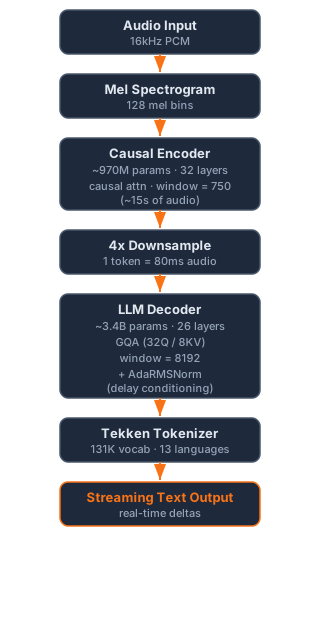
Let’s unpack the important parts.
Causal Attention: The Secret Sauce
In a standard transformer encoder (like Whisper’s), every audio frame can attend to every other frame — past, present, and future. This is called bidirectional attention, and it’s great for accuracy because the model has full context. But it means you need all the audio before you can process any of it.
Voxtral’s audio encoder uses causal attention instead. Each audio frame can only attend to itself and past frames — never future ones. Think of it like reading a book left-to-right without being able to flip ahead. This is what enables streaming: as new audio arrives, the encoder can immediately process it using only what it’s already seen.
Even the convolutional stem (the first layers that process the raw mel spectrogram) is causal — it uses two causal 1D convolutions that only look backward, with a 4-frame history buffer maintained during streaming. Causality runs all the way down.
Sliding Window Attention: Infinite Streaming
Both the encoder and decoder use sliding window attention. Instead of attending to the entire history (which would grow unboundedly for long audio), each layer only looks at a fixed window of recent tokens:
- Encoder: window size of 750 (~15 seconds of audio)
- Decoder: window size of 8192 tokens
This keeps memory and compute bounded regardless of how long the audio stream runs. A 3-hour meeting uses the same peak memory as a 5-minute conversation. The model card states a default max-model-len of 131,072 tokens, supporting approximately 3 hours of continuous audio.
Configurable Delay: The Accuracy-Latency Tradeoff
Here’s something clever: Voxtral lets you configure a transcription delay — how far behind the audio the text output lags. This maps directly to an accuracy-latency tradeoff:
| Delay | Behavior |
|---|---|
| 80ms | Fastest output, lower accuracy |
| 480ms | Recommended sweet spot |
| 2.4s | Highest accuracy, more lag |
At 480ms delay, Voxtral achieves error rates within 1-2% of offline (batch) models — meaning you get near-perfect transcription with barely perceptible lag.
This tradeoff is handled by Adaptive RMSNorm (AdaRMSNorm) — a delay conditioning mechanism present in every decoder layer. Here’s how it works: the target delay is encoded using a sinusoidal embedding (similar to positional encoding in the original Transformer), then projected through a small bottleneck MLP (3072→32→3072 with GELU activation) to produce a modulation vector. This vector scales the feed-forward network’s input in each layer:
output = FFN(RMSNorm(x) * (1.0 + g(delay)))
This adds only 5M extra parameters across all 26 decoder layers, but lets the model learn distinct behaviors for each latency target. During training, the delay is sampled uniformly from 80ms to 2400ms — so a single model serves all operating points.
The encoding ratio is neat: 1 text token = 80ms of audio. So a 480ms delay means the model is “6 tokens behind” the live audio.
How It Was Trained
Voxtral Realtime is built on what Mistral calls the Delayed Streams Modeling framework. The core idea: during training, the model emits exactly one output token per 80ms audio frame. Two special tokens make this work:
- [P] (padding) — emitted when there’s no text to produce yet (the model is “waiting”)
- [W] (word boundary) — marks the start of a new word
This alignment is what lets the model trade off delay and accuracy — at lower delay, it has to commit to text earlier; at higher delay, it gets more audio context before making predictions.
![Delayed Streams Modeling — each 80ms audio frame produces exactly one output token. Padding tokens [P] fill silence, word boundaries [W] mark word starts, and actual text tokens carry the transcription. Source: Mistral AI.](/images/voxtral-realtime-architecture.jpeg)
Training happens in two phases:
- Encoder warmup (5%) — the decoder is frozen (remember, it comes from Ministral 3B), and only the encoder and adapter learn to produce useful audio representations
- End-to-end joint training (95%) — all parameters are unfrozen and trained together on a large-scale dataset spanning 13 languages
One interesting engineering detail: the encoder uses 32 left-padding frames at the start of each audio stream. The technical report notes these serve a similar role to attention sinks — a phenomenon where transformer models benefit from having dedicated tokens that absorb attention weight, improving stability for long sequences.
Benchmarks: How Good Is It?
For a streaming model, the numbers are impressive — especially compared to offline models that get to see the full audio:
Macro-Average WER across benchmarks (from the technical report):
| Model | Type | Delay | FLEURS (13 langs) |
|---|---|---|---|
| Whisper Large V3 | Offline | — | 8.23% |
| Voxtral Mini Transcribe V2 | Offline | — | 5.90% |
| Voxtral Realtime | Streaming | 480ms | 8.72% |
| Voxtral Realtime | Streaming | 960ms | 7.70% |
| Voxtral Realtime | Streaming | 2400ms | 6.73% |
At 480ms delay, Voxtral Realtime matches Whisper Large V3 — a fully offline model — while running in real-time. At 960ms, it surpasses Whisper. And at 2.4s delay, it approaches the quality of Mistral’s own offline transcription model.
Per-language FLEURS results (480ms delay):
| Language | Word Error Rate |
|---|---|
| English | 4.90% |
| Spanish | 3.31% |
| German | 6.19% |
| Average (13 langs) | 8.72% |
The model supports 13 languages: English, Spanish, French, German, Italian, Dutch, Portuguese, Arabic, Hindi, Chinese, Japanese, Korean, and Russian.
Running It: From Cloud to Laptop
vLLM: Production-Grade Streaming
The recommended way to run Voxtral Realtime is with vLLM, which added first-class streaming ASR support.
vLLM’s streaming implementation is worth understanding. Traditional inference servers expect complete prompts upfront. For streaming audio, vLLM introduced a new pattern:
- An anchor request is created when the first audio chunk arrives
- Subsequent audio chunks are appended to the ongoing request
- The model continuously generates text tokens between input chunks
- Output tokens may be revised as more audio context arrives (the model can correct earlier predictions)
This is exposed via a WebSocket API at /v1/realtime, enabling bidirectional streaming — you send audio chunks in and receive text deltas back, just like a conversation.
# Serve the model
vllm serve mistralai/Voxtral-Mini-4B-Realtime-2602

# Connect via WebSocket for streaming
# Send: input_audio_buffer.append (audio chunks)
# Receive: response.text.delta (text fragments)
The vLLM blog post goes into excellent detail on the engineering challenges of streaming input — including how they handle KV cache management when new input invalidates the “most recent forward pass” token.
Hugging Face Transformers: Quick Start
Support for Voxtral Realtime was recently added to Hugging Face Transformers. For batch transcription (non-streaming), you can use it directly:
from transformers import (
    VoxtralRealtimeForConditionalGeneration,
    AutoProcessor
)
from mistral_common.tokens.tokenizers.audio import Audio
from huggingface_hub import hf_hub_download

# Load model
processor = AutoProcessor.from_pretrained(
    "mistralai/Voxtral-Mini-4B-Realtime-2602"
)
model = VoxtralRealtimeForConditionalGeneration.from_pretrained(
    "mistralai/Voxtral-Mini-4B-Realtime-2602",
    device_map="auto"
)

# Load and preprocess audio
audio_file = hf_hub_download(
    repo_id="patrickvonplaten/audio_samples",
    filename="bcn_weather.mp3",
    repo_type="dataset"
)
audio = Audio.from_file(audio_file, strict=False)
audio.resample(processor.feature_extractor.sampling_rate)

# Transcribe
inputs = processor(audio.audio_array, return_tensors="pt")
inputs = inputs.to(model.device, dtype=model.dtype)
outputs = model.generate(**inputs)
print(processor.batch_decode(outputs, skip_special_tokens=True)[0])
You can also try it right now in the browser on the interactive Hugging Face Space — no setup required.
MLX: Running on Apple Silicon
This is where the open-source community shines. Two recent pull requests bring Voxtral Realtime to Apple’s MLX framework, enabling it to run natively on Mac hardware:
mlx-audio (Python) — This PR adds full Voxtral support to the mlx-audio framework. The implementation includes the complete causal encoder, GQA decoder, and an incremental encoder optimization that reduces time-to-first-token from ~2700ms to ~570ms for 127-second audio clips — a 4.7x speedup. Pre-converted weights are available in both FP16 and INT4 variants on Hugging Face, so you can get started without any model conversion.
mlx-audio-swift (Swift) — This PR ports the entire implementation to Swift, making Voxtral available for native macOS (and potentially iOS) applications. It includes a demo macOS app that captures microphone audio at 16kHz, runs energy-based voice activity detection, and transcribes speech — all on-device. No cloud API calls needed.
Both implementations leverage MLX’s native mx.fast.scaled_dot_product_attention for efficient grouped-query attention, and the INT4 quantized variant brings the memory footprint low enough to run on machines with 16GB of unified memory.
The Bigger Picture: Voxtral Transcribe 2 Family
Voxtral Realtime is part of the broader Voxtral Transcribe 2 family from Mistral AI, which includes two models:
| Voxtral Mini Transcribe V2 | Voxtral Realtime | |
|---|---|---|
| Use case | Batch processing | Live streaming |
| Features | Speaker diarization, word-level timestamps, context biasing | Sub-200ms streaming |
| Ideal for | Meeting transcription, subtitles, compliance docs | Voice agents, live captions, contact centers |
| License | API access | Apache 2.0 (open weights) |
The fact that the Realtime variant is fully open-weight under Apache 2.0 is significant — it means you can deploy it on-premise for GDPR/HIPAA compliance, fine-tune it for domain-specific vocabulary, or integrate it into products without API costs.
Try It Yourself
The 4.4B model requires ~16 GB VRAM at FP16 for GPU inference, or runs comfortably on Apple Silicon Macs with 16GB+ unified memory using INT4 quantization via MLX. The fastest ways to get started:
- Browser: Try the Hugging Face Space demo — no setup needed
- Python (GPU): Use the Transformers code above with a 16GB+ GPU
- Python (Mac): Install mlx-audio and use the pre-converted weights
- Production: Deploy with vLLM for WebSocket streaming
- Swift (macOS): Check out mlx-audio-swift for native app integration
Wrapping Up
Voxtral Realtime represents a meaningful step for open-source speech recognition. A natively streaming ASR model — with causal attention, sliding window for infinite audio, configurable latency via AdaRMSNorm, and a decoder bootstrapped from Ministral 3B — released under Apache 2.0 with weights on Hugging Face. The community response has been swift (pun intended): within weeks of release, we have Python MLX, Swift, and vLLM implementations enabling everything from cloud deployments to on-device macOS apps.
If you’re building anything that involves live audio — voice agents, accessibility tools, live captioning, meeting assistants — Voxtral Realtime is worth a serious look.
Links: